Running Nginx as a Windows Service (Windows Server 2025)
As we know, Nginx works extremely well on Linux. Unfortunately, the Windows version of Nginx is not developed as actively, and because of this it does not support running as a native Windows service.
This limitation can be inconvenient when deploying Nginx on Windows Server 2025, especially in production environments where services are expected to start automatically and run in the background.
Fortunately, this problem can be solved using third-party tools that allow you to run any executable (.exe) as a Windows service.
Tools for Running EXE Files as Windows Services
There are many utilities that can convert an executable file into a Windows service, including:
- AlwaysUp
- NSSM (Non-Sucking Service Manager)
- WinSW
- SrvStart
- EXE Service
In this article, we will use EXE Service, as it already provides a ready-made example configuration for Nginx and has both GUI and command-line support.
Running Nginx as a Windows Service
Step 1: Open EXE Service
After installing EXE Service, a shortcut will appear on your desktop.
The graphical interface is only intended to make service creation easier.
If you are working on a Windows Server without a GUI, you have two options:
- Create the service on a regular PC and then transfer it to the server
- Run EXE Service directly on the server using the command line
Step 2: Create a New Service
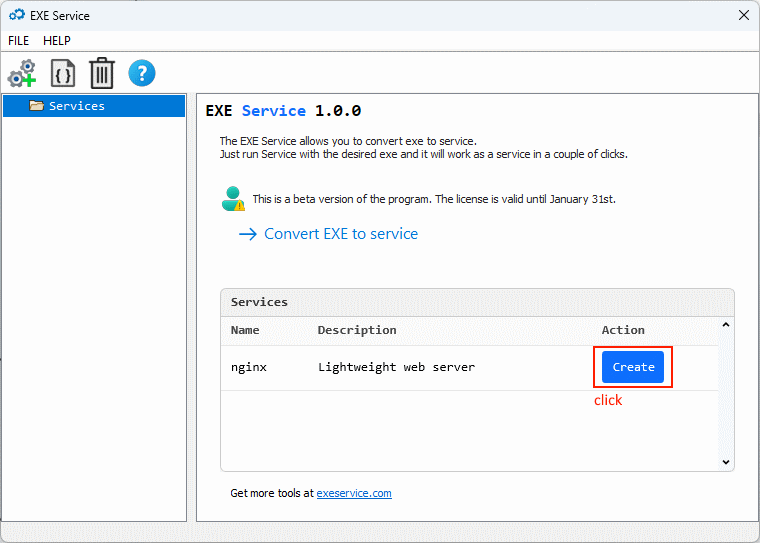
EXE Service already includes a ready-made Nginx example.
Simply click the “Create from example” button.
Step 3: Configure the Nginx Path
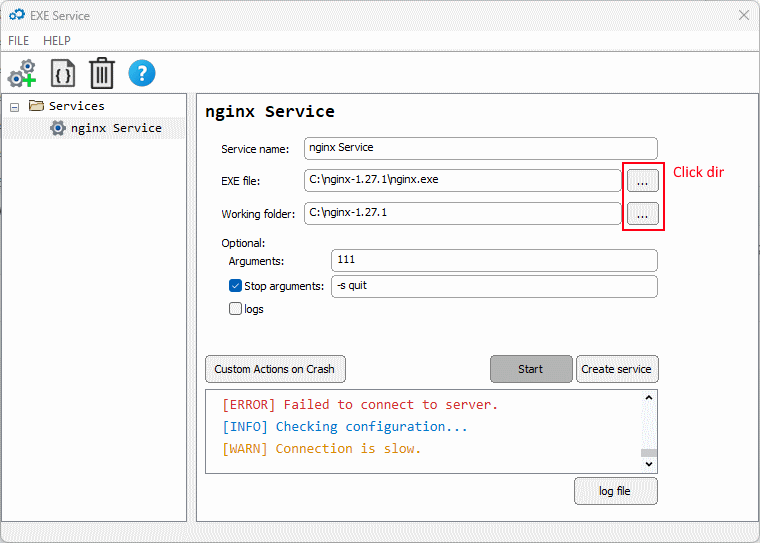
In the window that appears, you need to specify the correct path to:
- The Nginx directory
- The nginx.exe executable file
Make sure the path matches your actual Nginx installation location.
Step 4: Save and Start the Service
Click “Create service” to create the Windows service.
If you want the service to run immediately on this computer, click “Start”.
After this, Nginx will:
- Run as a Windows service
- Start automatically with the system
- Be manageable via the Windows Services manager
Transferring the Service to Another Server
If you plan to move the service configuration to another Windows Server, follow the official EXE Service transfer instructions provided in their documentation.
This approach is especially useful when deploying identical configurations across multiple servers.
Conclusion
Although Nginx does not natively support running as a Windows service, tools like EXE Service make it easy to integrate Nginx into a Windows Server 2025 environment.
This setup ensures better stability, automatic startup, and easier service management — bringing the Windows experience closer to what administrators are used to on Linux.