Convert Js to Service(NodeJs): Run NodeJs as Windows Service
Many people probably know that NodeJS has huge memory leaks when running as a service. I think this will be no exception for Windows.
Consequently, standard programs such as: NSSM https://nssm.cc/ WinSW are not suitable for converting NodeJS to Service. There are commercial programs that monitor memory leaks:
- AlwaysUp
- FireDaemon Pro
- EXE Service
We'll use EXE Service because it already provides a ready-made configuration example for converting NodeJS to Service and also has js scripts for fixing the service to ensure stable operation.Don't worry about using JavaScript (ES2023) in "EXE to Service"; it uses its own js engine designed to fix services and notify us of poor service activity.
How to Run Node.js as a Windows Service
Step 1: Open EXE Service
After installing EXE Service, a shortcut will appear on your desktop.
The graphical interface is intended only to simplify service creation.If you're running Windows Server without a graphical interface, you have two options:
- Create the service on a regular PC and then transfer it to the server.
- Run exeservice.exe directly on the server using the command line. (The graphical interface supports Windows Nano/Core)
Step 2: Create a New Service
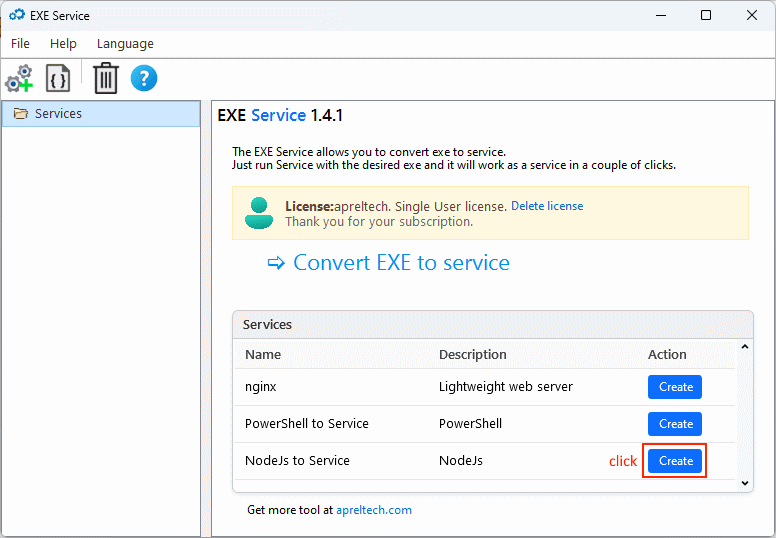
EXE Service already includes a ready-made js to Service (NodeJS) example.
Just click the "Create from example" button.
Step 3: Set the Path to the NodeJS Scripts
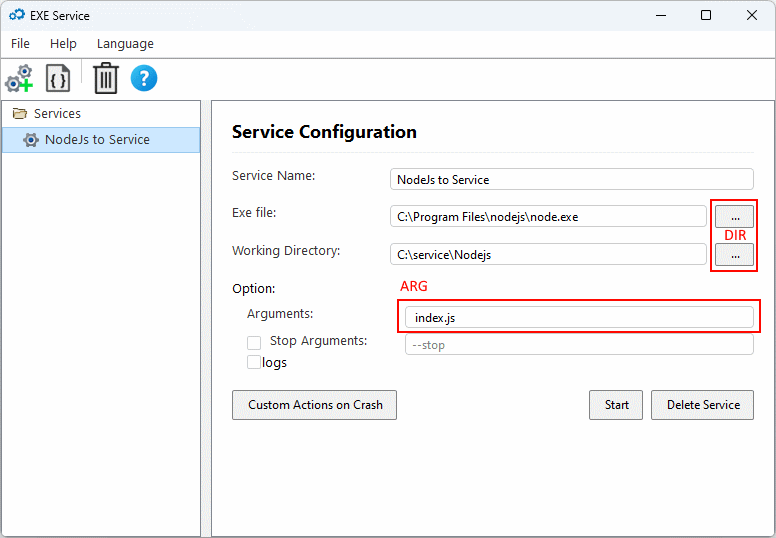
In the window that appears, you must specify the correct paths:
- Path to the nodejs.exe executable file:By default:
C:\Program Files\nodejs\ - Working Directory:Specify the folder where your scripts are located.
- Arguments:Specify the arguments for running nodejs.
Step 4: Save and Start the Service
Click "Create Service" to create a Windows service.
If you want the service to start immediately on this computer, click "Start".
After this, NodeJS will:
- Start as a Windows service
- Start automatically with the system
- Be manageable through the Windows Service Manager (
services.msc)
In the following articles, I'll explain how to create notifications and how to deal with critical situations with Node.js when it has memory leaks.